
Guide / Materials
Reblend Surface
One node for physically exact materials: its inputs, measured colors and metals, and how it measures against OpenPBR 1.2.
Reblend Surface is Reblend's own material node, built on OpenPBR 1.2. Reblend renders it physically exact, and it carries everything the spectral engine adds: measured colors and metals, fluorescence, diffraction, dispersion and what fills a glass. Blender's own shader nodes keep the look they have in Cycles; Reblend Surface is where you go for more.
It is a node group, so the file opens anywhere. Blender's Cycles and EEVEE, and Blender without the addon, render the nearest Principled BSDF built inside it, without the extras.
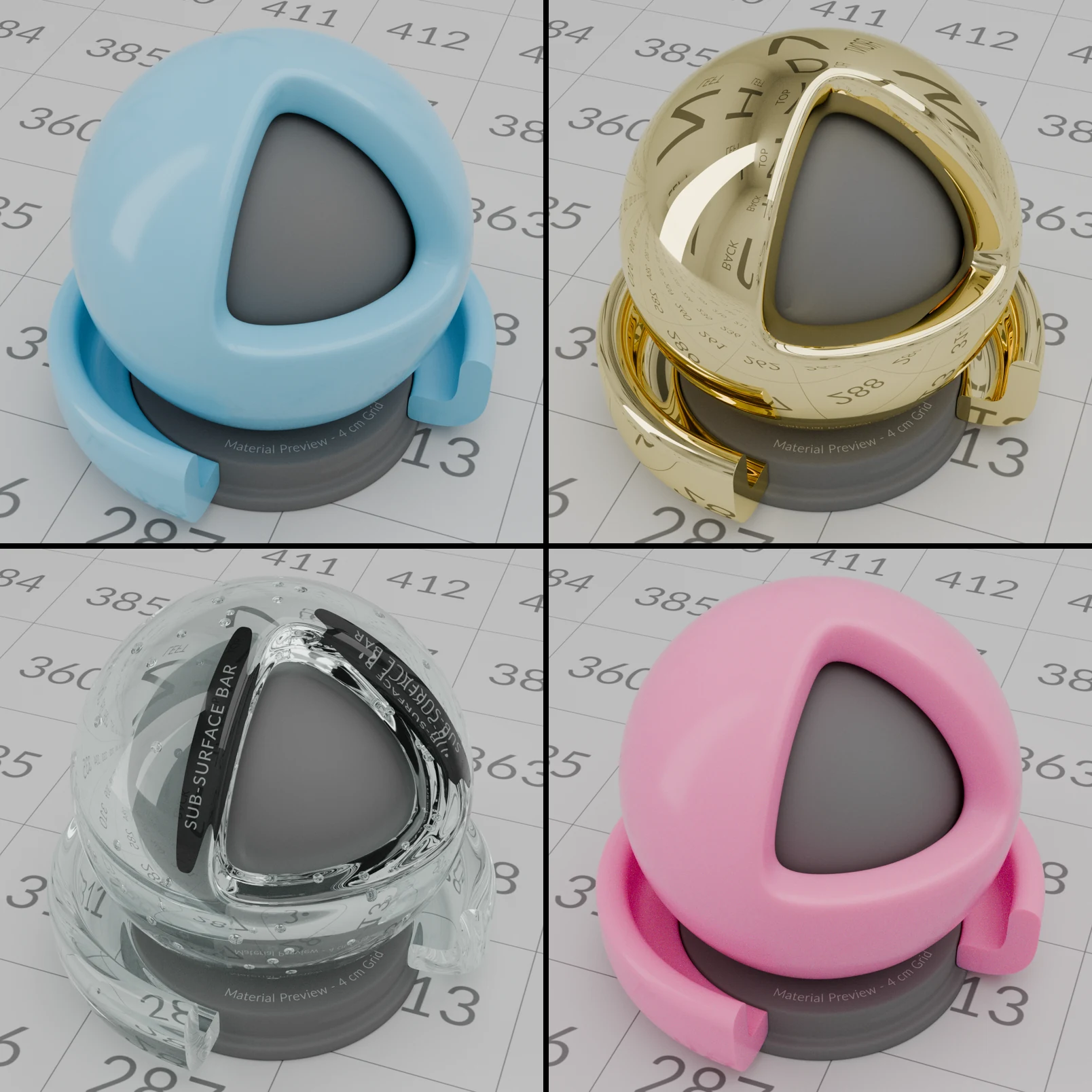
Add it
Under the Reblend engine, the New button in Material Properties and in the shader editor header makes a material with Reblend Surface already connected. Copies of materials, materials made by scripts and other addons, and imported or appended ones keep Blender's Principled BSDF.
In the shader editor: Add > Shader > Reblend Surface, or Add > Shader > Reblend Surface Presets for a starting point.
Inputs
The node follows OpenPBR's own layout, with the specification's names, as Blender's OpenPBR node does. Its inputs sit in panels; Base, Specular and Geometry are open on a new node:
- Base
- The surface under the reflection: Weight, Color with Measured Color, Metalness with Measured Metal, and Diffuse Roughness (above 0 gives the flat, powdery look of clay or plaster).
- Specular
- The reflection on top: Weight (1 is correct for the IOR), Color, Roughness, Anisotropy, IOR, Haze (a wider, softer halo around the highlight), Retroreflectivity (light thrown back toward its source, as on road signs) and Diffraction.
- Transmission
- Glass and liquids: Color, Depth and Scatter, Dispersion Scale and Abbe Number, and Interior Medium.
- Subsurface
- Light that enters and spreads, as in skin or wax, with its own Color and Radius.
- Coat
- A clear layer, as varnish or car paint, with its own Roughness, Anisotropy, IOR and Darkening (1 is physical).
- Fuzz
- A soft fuzz on top, as on velvet and other fabric.
- Emission
- Brightness in Nits (as a screen is rated) or Lumens (the whole object's output, as a bulb's box states; resizing the object keeps it).
- Thin Film
- Soap bubbles and oil on water: Weight, Thickness (µm) and IOR.
- Geometry
- Opacity (cut-out transparency), Thin Walled, and Normal, Tangent, Coat Normal and Coat Tangent.
Nodes from earlier files move to this layout when the file opens, with their values and links. Every input has a tooltip. Inputs that do nothing with the other settings are greyed out, as Measured Metal is while Metalness is 0.
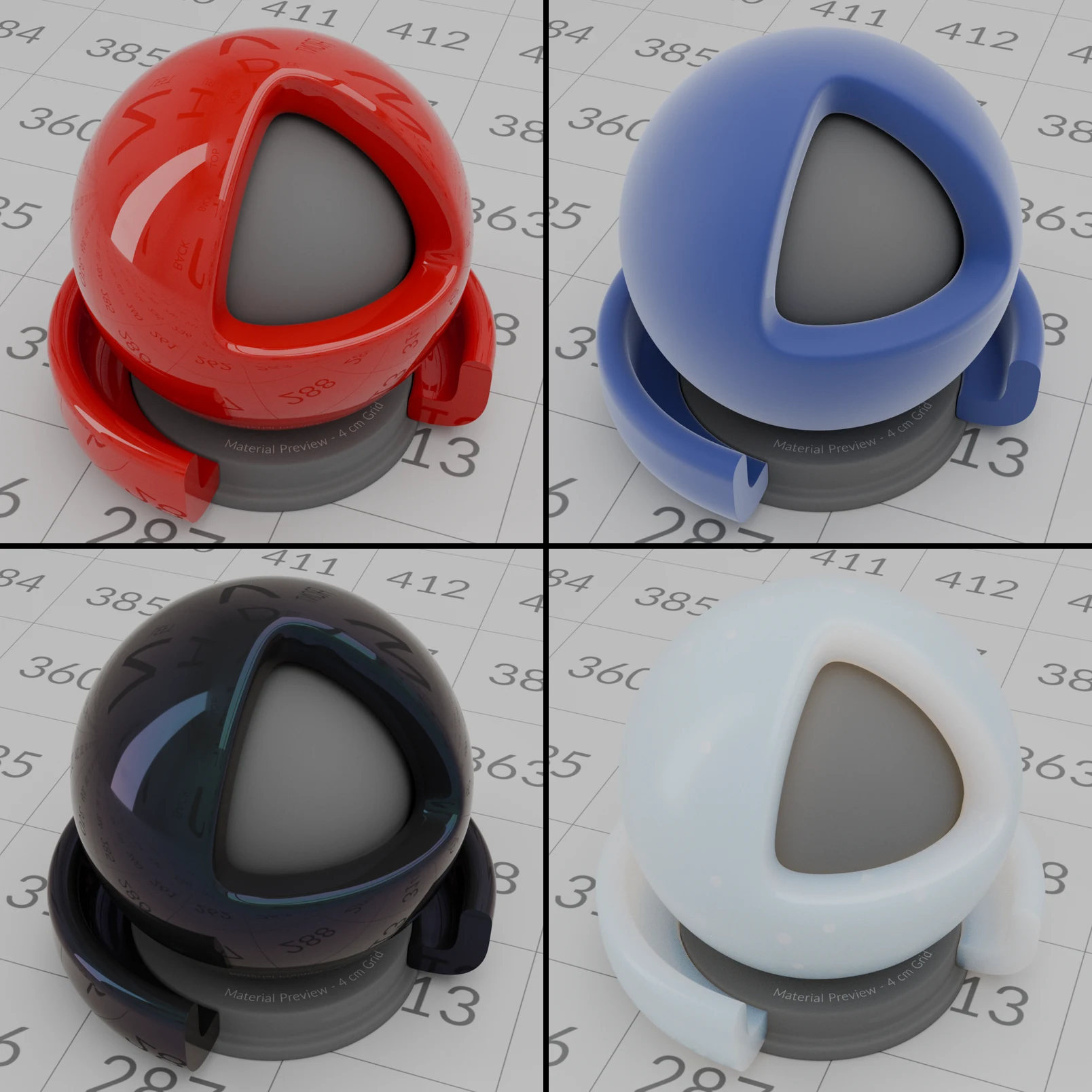
Measured Color
Real surfaces measured in the lab: green leaf, lawn grass, dry grass, snow, concrete, asphalt, pine plywood, cardboard, quartz sand and limestone. Picking one writes its daylight color into the Base Color, so the viewport, EEVEE and Cycles show it, and Reblend keeps the real surface's color under any light. Editing that color by hand sets the menu back to None.
The last 13 entries are fluorescent: papers and plastics with optical brighteners, highlighter yellow, fluorescent pigments and fabrics. Fluorescence Amount sets how strongly they glow; see Spectral light.
Measured Metal
37 metals from measured data, needing Metalness above 0: the 35 of the Metallic BSDF list, plus lead and zinc. Picking one writes the metal's color into the Base Color. The metal keeps its real color at every angle and between reflections.
Diffraction
In the Specular panel: CD, DVD, Holographic Foil, or Custom with your own Groove Spacing and Groove Depth (0 gives no colors). The grooves run along Tangent. See Spectral light for examples.
Glass, liquids and dispersion
Transmission Color with Depth 0 tints the surface. With Depth above 0, it is the color reached at that depth inside, so thick parts look deeper in color and thin parts paler. Scatter makes the inside cloudy, for milky liquids or frosted ice. It needs Depth above 0 and a Transmission Color darker than white: for a milky white, set Transmission Color to dark grey and Scatter to white.
Interior Medium fills the inside with a real medium: Water (pure water's measured absorption), Rayleigh (scattering that turns blue, as in clear air), Haze, Water Droplets (rain, spray or mist; shows rainbows) or Ice Crystals (shows halos around lights). It needs Transmission Weight above 0.
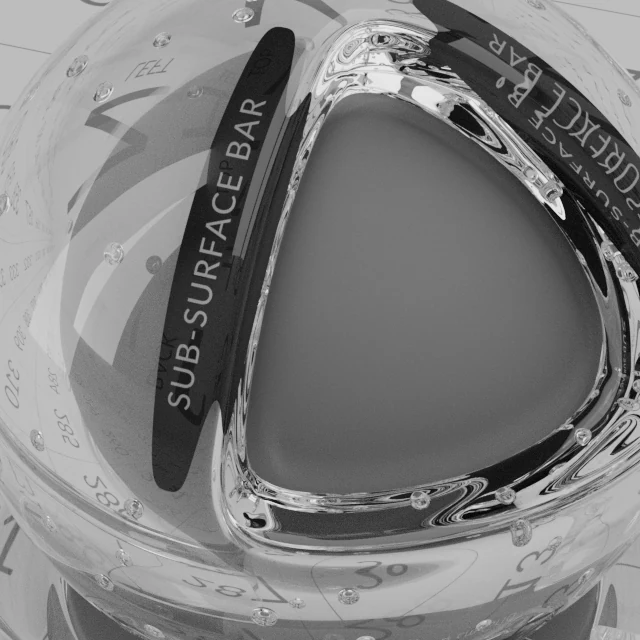
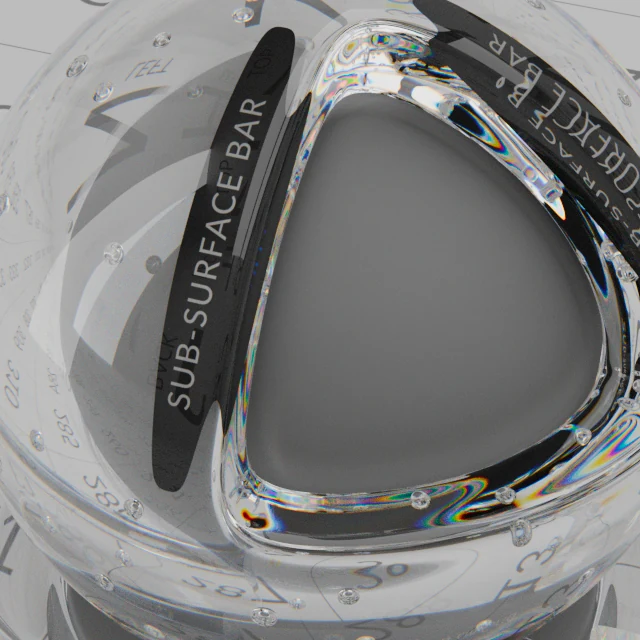
Dispersion Scale splits refracted light into colors, as a prism does; Abbe Number sets how much, lower splitting more.
 01
A close-up of the cut faces of a glass ball, IOR 1.6, at Dispersion Scale 0 and 1, Abbe Number 20.
When the node has a Depth above 0, Reblend Surface connects its Volume output to the Material Output for you, so Cycles and EEVEE show the tint too. It removes that link again when Depth goes back to 0 or Thin Walled is on; a Volume link you made yourself stays.
For glass and liquid that touch or sit inside each other, see Nested Dielectrics.
Presets
Add > Shader > Reblend Surface Presets has Glass, Water, Ice and Diamond, with their measured IORs, and a Metals menu with all 37 metals. Right-click selected Reblend Surface nodes for Reblend Surface Preset: the same list plus Plain, which puts every input back to its default. A preset sets only its own inputs; connected inputs stay connected.
Convert
Under the Reblend engine, Material Properties shows Convert to Reblend Surface while a material has a Principled BSDF. It keeps values and links. The look changes once, since Reblend Surface renders the physically exact model. A few Principled inputs have no exact match, such as Specular IOR Level other than 0.5; the report after converting names any that were dropped or approximated.
Right-click selected nodes in the shader editor for Convert to Principled BSDF. It keeps what Principled can hold and names what it drops, such as Haze, Retroreflectivity, Transmission Depth and the measured menus.
How I know it is correct
OpenPBR is the open material standard of the Academy Software Foundation. Its specification gives the formula for what every input does. Version 1.2 is still being written; Reblend Surface follows its draft of 11 November 2026.
I tested every input of Reblend Surface against those formulas: 89 small scenes with known answers, rendered in spectral mode, the way you render. I rendered the same scenes with the Principled BSDF in Blender 5.2.3's Cycles. Three of those tests can be seen at a glance; the numbers follow.
The white furnace
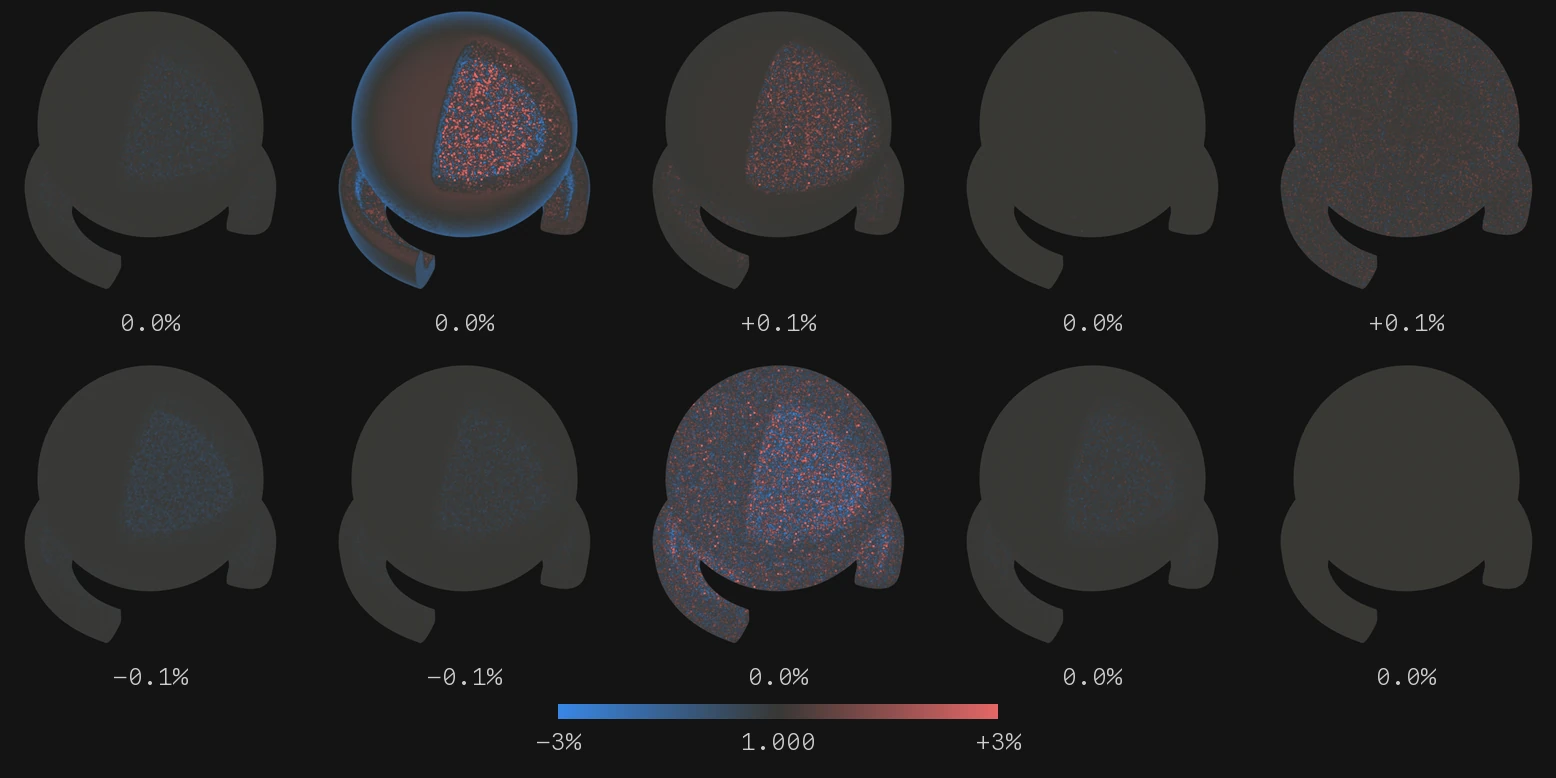
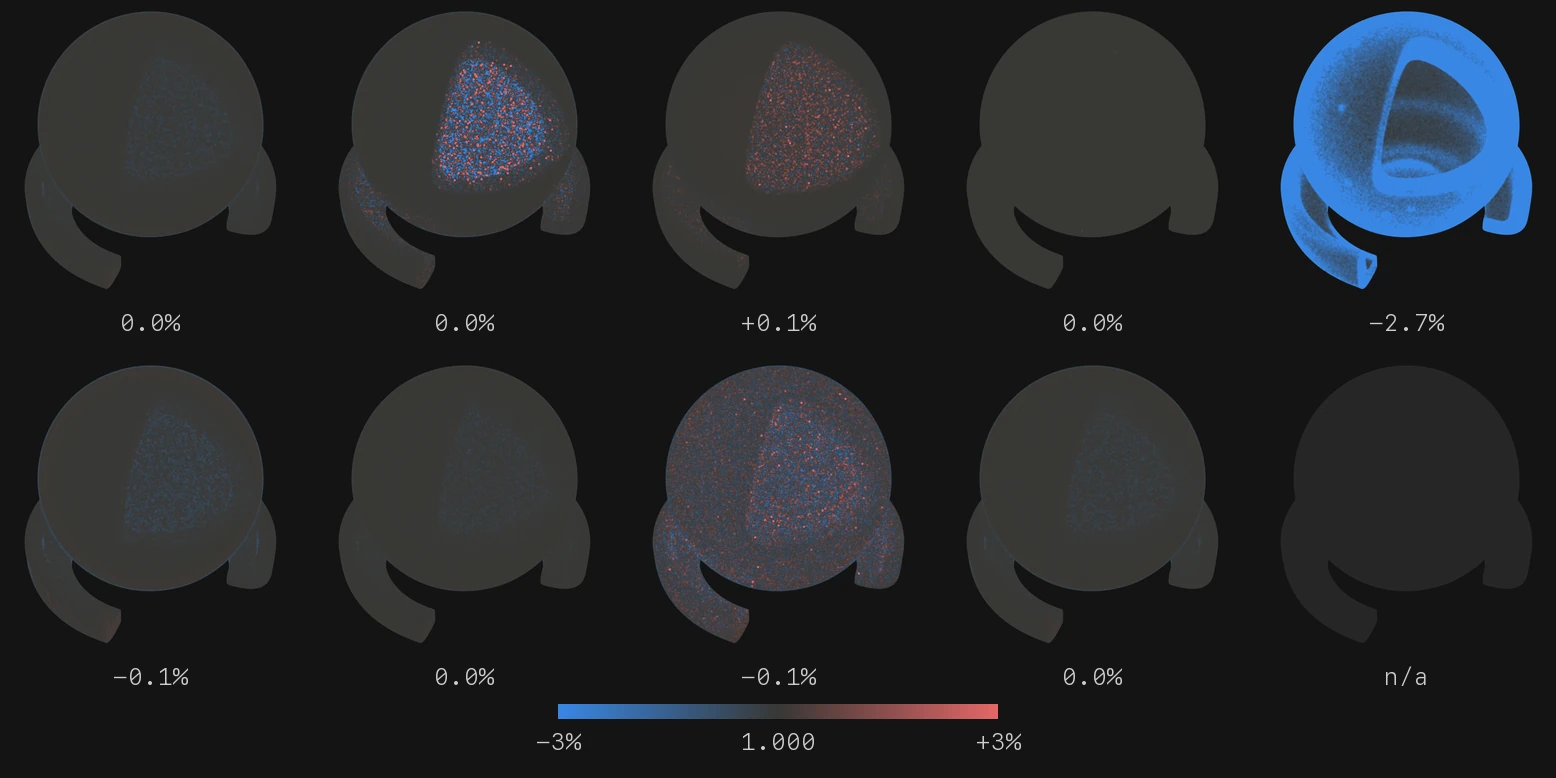
Put a white object in a white world that lights it evenly from every side. If its material reflects all the light it receives, the object disappears: everywhere you look you see exactly the light you would see without it. A material that loses light shows up darker, one that adds light brighter. Light bounces many times inside the hollow ball and under its rim, so the shader ball shows even small losses.
Each ball below is drawn as a map of that difference: grey where the render equals the white world, blue where light is lost, red where light is added, at full color by 3%. The number is the ball's average difference in its color channel furthest from white.
 ReblendCycles
Top row: diffuse, rough diffuse, rough metal, glass, rough glass. Bottom row: coat, fuzz, subsurface, thin film, and Transmission Scatter, which the Principled BSDF does not have.
Every Reblend ball averages within 0.1% of white. The rough diffuse ball is slightly red where you see it head-on and blue toward its edge, which averages out; see Where Reblend is not exact, below. Cycles matches Reblend everywhere except rough glass, which loses 2.7% of the light. The ball's grey core is left out here: it sits in a gap so narrow that light needs more bounces to get out than either engine allows, which darkened both engines' balls alike by 0.1%.
Same scene, same settings
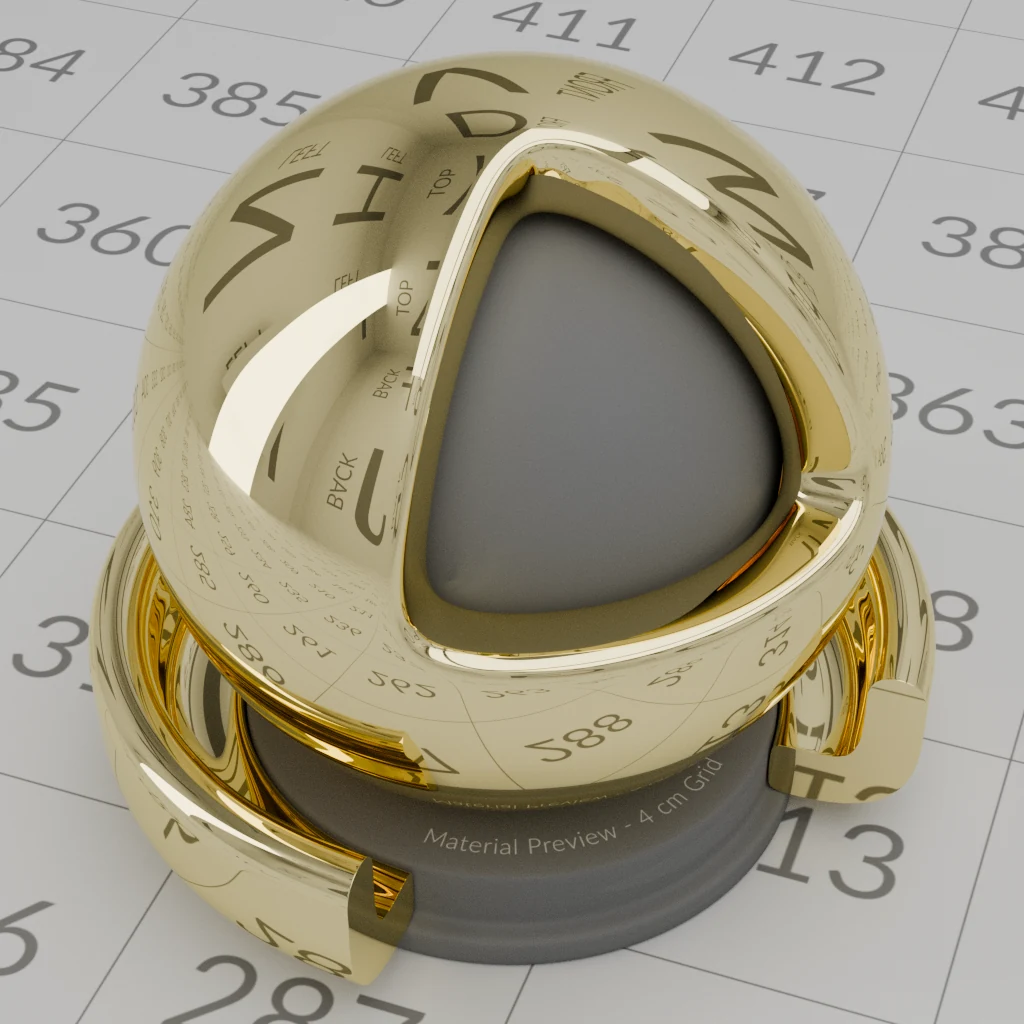
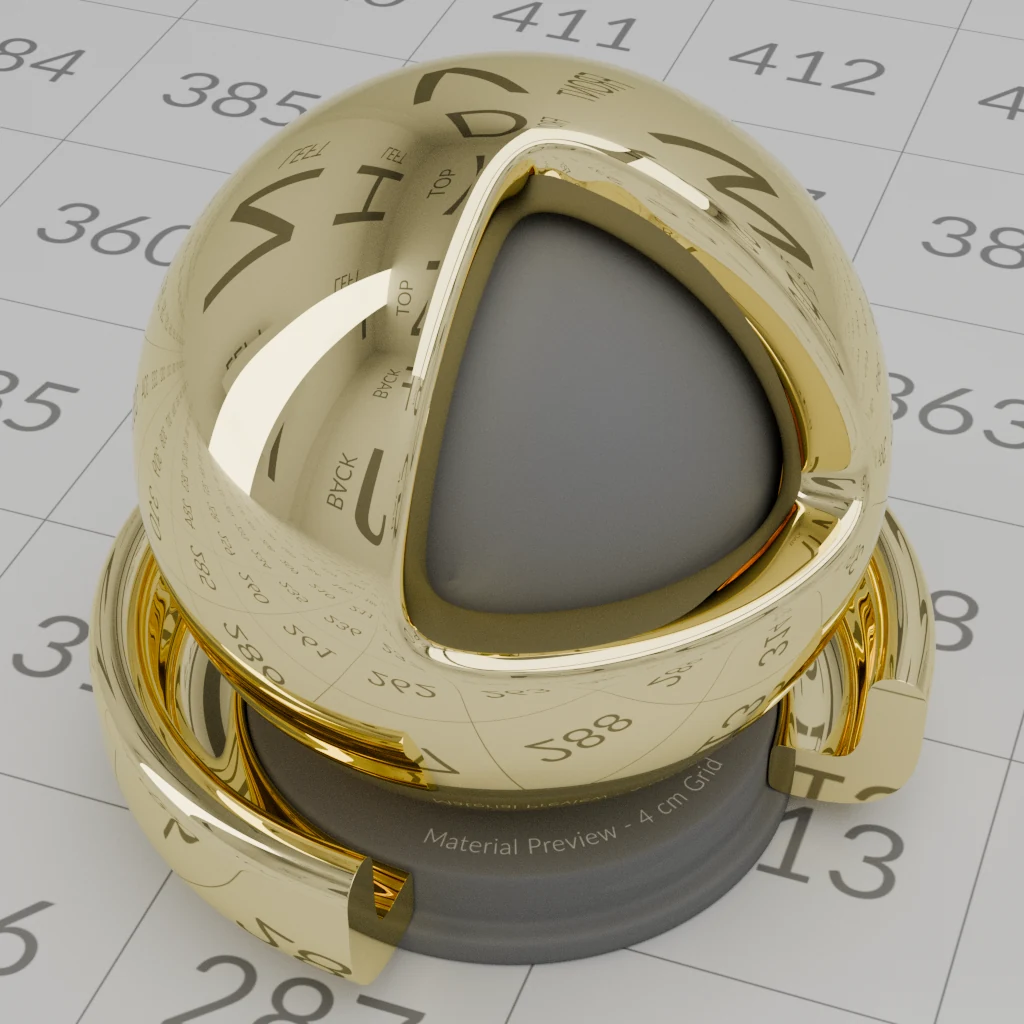
Each pair below is one file rendered by both engines: the same ball, room, lights, camera and samples, no denoiser, and one color pipeline for both (AgX, Medium High Contrast). Reblend renders Reblend Surface; Cycles renders the Principled BSDF with the same values.
Where OpenPBR and the Principled BSDF describe the same physics, the pictures match. The scene's own gold is below; its plastic matches as closely: the two frames' average color differs by under 0.4% in every channel.
 ReblendCycles
A clear coat is where they part. Light reflected back down inside the coat reaches the base again and gives up a little more of its energy each time, so a coated surface looks darker and deeper in color, as a wet stone or a varnished board does. OpenPBR calls this coat darkening. The Principled BSDF leaves it out, so its coat sits on the base like a separate sheen.
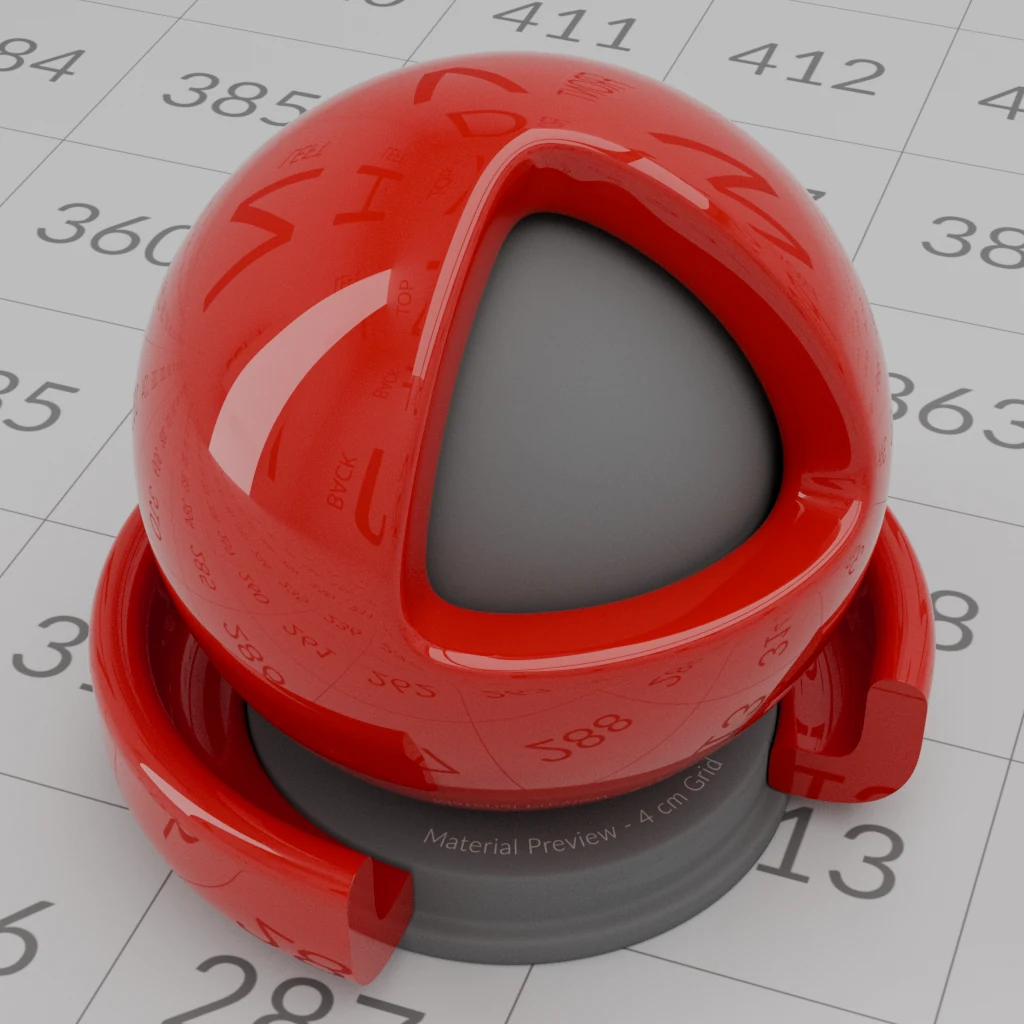
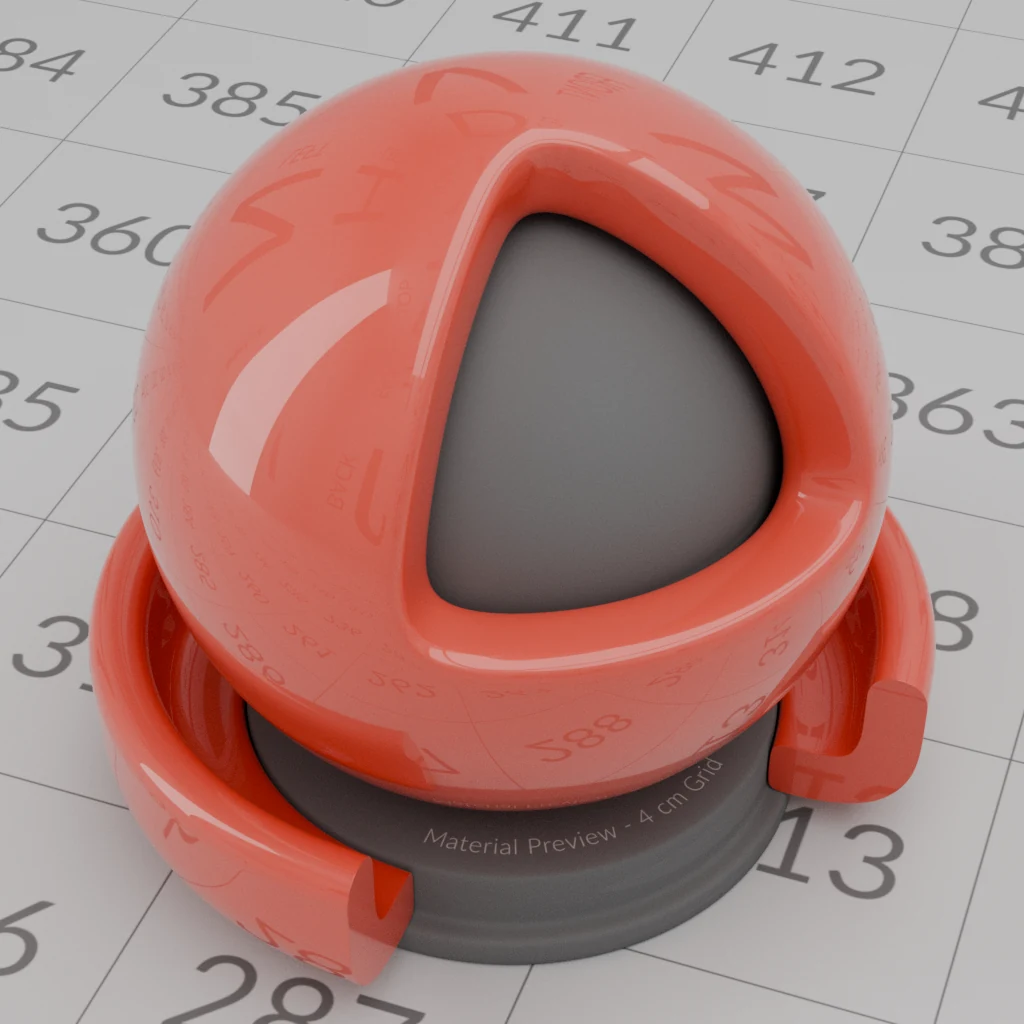 ReblendCycles
Measured on a grey base of 0.5 under a clear coat, head-on: following every bounce inside the coat gives 0.2983, Reblend 0.2984, Cycles 0.5266.
Against the formulas
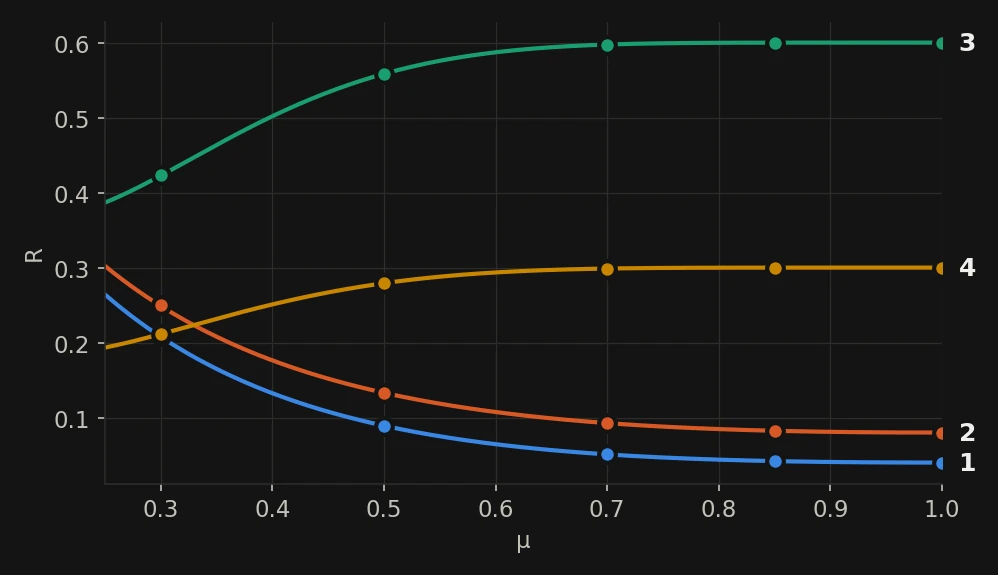
A selection of the checks, with the answer from the OpenPBR 1.2 formula. Mu is the cosine of the viewing angle: 1 is head-on, 0.5 is 60°. Reblend's numbers are the mean of the three color channels unless three are given.
| Test | OpenPBR 1.2 | Reblend | Cycles Principled |
|---|---|---|---|
| Glass reflection, IOR 1.5, head-on | 0.0400 | 0.0400 | 0.0400 |
| Specular Weight 2 on glass, head-on | 0.0800 | 0.0800 | 0.0800 |
| Specular Color 0.5 on a black base, mu 0.5 | 0.0446 | 0.0446 | 0.0702 |
| Specular Color 0.5 on a white base, head-on | 0.980 | 0.980 | 1.000 |
| Diffuse Roughness 1, Base Color 0.5, head-on | 0.4390 | 0.4391 | 0.4137 |
| Metal with edge color 0.5, mu 0.5 | 0.5584 | 0.5583 | 0.5583 |
| Metal with edge color 0, mu 0.3 | 0 | 0.0000 | 0.0000 |
| Rough glass, roughness 0.5, white furnace, mu 0.5 | 1 | 1.0001 | 0.9794 |
| White subsurface on a solid sphere, white furnace, head-on | 1 | 0.9995 | 0.9756 |
| Subsurface Color 0.5, head-on | 0.520 | 0.526 | 0.467 |
| Clear coat over Base Color 0.5, head-on | 0.2983 | 0.2984 | 0.5266 |
| Thin film 350 nm, IOR 2.0, mu 0.7 (R, G, B) | 0.0495, 0.2077, 0.0853 | 0.0495, 0.2077, 0.0854 | 0.0592, 0.2079, 0.0835 |
| Base Color 2.0, white furnace, head-on | 1.000 | 1.000 | 1.960 |
| Dispersion through a 10° wedge, Abbe 20: where the light edge sits for R, G, B (mm) | −170.99, −174.67, −181.73 | −170.97, −174.67, −181.72 | No dispersion on the Principled BSDF in 5.2 |
Of the 89 checks, 88 land within the tolerance set before the render; the last is under Where Reblend is not exact, below. Every check ran on the CPU and the GPU of an Apple M1 Pro, which agree within 0.03%. The subsurface target of 0.520 is Subsurface Color plus the surface's own 4% reflection; OpenPBR lets an implementation approximate how the color maps to the material inside, and Reblend lands within 1.3% of it.
What changed since OpenPBR 1.1, and why
These are the changes in the 1.2 draft and the reasons the specification's authors gave. Each one is measured in Reblend.
- Input ranges are enforced (#277)
- Every input is clamped to the range in the specification's parameter table, "to ensure defined and portable behavior across renderers". A Base Color of 2 would otherwise reflect more light than arrives. Measured: Base Color 2 reads 1.000 in the white furnace (Cycles reads 1.960); Specular Color, Coat Color, Fuzz Color and Emission Weight above 1 are held at 1 the same way.
- Metal reflection never goes below zero (#256)
- The metal edge color formula from 1.1 gives negative reflection for some inputs: a metal with Base Color 0.04 and edge color 0 reflects −0.11 near mu 0.25. 1.2 clamps it at zero. Measured: 0.0000 at mu 0.3.
- Specular Weight above 1 on metals (#238, #316)
- In 1.1, Specular Weight above 1 multiplied the metal's whole reflection and could take it past 100%. Now a weight above 1 raises the metal's color and edge color, each capped at 1, so the reflection always stays physical. Measured: a metal with color 0.3 at weight 2 reflects 0.600 head-on, matching the formula at every angle.
- Specular Weight leaves refraction alone (#247)
- Specular Weight changes how strongly glass reflects. In 1.1 it did that by changing the IOR, which also bent the light passing through, so turning down a reflection moved what you see through the glass. Measured: at weight 2, the light edge seen through the wedge stays where IOR 1.5 puts it.
- Specular Color stays on the reflection (#330)
- Specular Color tints the reflection only. The light it takes away is not handed to the base underneath, which would have shifted the base toward the opposite color. Measured: a white base under Specular Color 0.5 reads 0.980, as the formula says; the specification notes that Cycles includes the tint, and the Principled BSDF reads 1.000.
- Coat darkening without a color shift (#253)
- With Coat Darkening at 0, the coated base keeps the brightness the simple formula gives. In 1.1 a strongly colored coat could shift the base's color as darkening was turned down. Measured: an amber coat at darkening 0 matches the formula within 0.0007 in each channel; at darkening 1, checked per color channel with spectral mode off, it matches the exact multiple-bounce answer within 0.0002.
- Transmission Scatter is a color (#286)
- Scatter used to be a coefficient whose result depended on Depth. Now it is the scattering albedo: 0 is clear, 1 scatters without absorbing. Measured: a scattering white glass reads 1.000 in the white furnace.
- New: Haze, Retroreflectivity and Emission Weight (#254, #255, #231)
- Haze adds a soft halo around a highlight without roughening the whole reflection, as on hazy lacquer. Retroreflectivity sends light back toward its source, as road signs do. Emission Weight scales emission from 0 to 1. Measured: haze equals the mix of its two lobes, retroreflection equals a mirrored-light reference exactly, and white haze on metal reads 1.000 in the furnace.
Two smaller changes came in the 1.1 updates. The thin film section now describes computing interference per wavelength (#262), which is what Reblend does. Depth and Radius now default to centimeters when a file does not say otherwise (#331); in Blender they follow the scene's units, as the Principled BSDF's do.
Where Reblend is not exact
Diffuse Roughness is exact on its own: a white rough base without the specular layer reads 1.000 at every angle. Under the default specular layer it reads 0.44% above 1 head-on and 0.8% below at mu 0.3, close to 1 on average. That comes from the reciprocal form OpenPBR 1.2 gives for a diffuse base under the specular layer: it is exact for a base at Diffuse Roughness 0, where it reads 1.000, and the specification leaves rougher bases to the implementation. Cycles reads 1.000 here.
Subsurface Color lands 0.6% to 1.3% above its target, as in the table above.
The Standard Shader Ball is by Chris Rydalch, André Mazzone and Thomas Anagnostou, from the Academy Software Foundation USD Working Group's assets, used under CC BY 4.0. For these pictures I converted its maps from ACEScg to linear Rec.709 and gave its room plain diffuse materials, as its notes describe.